Jiby's toolbox
Jb Doyon’s personal website
Mobile-based development with Termux on Android
I’ve written a lot about Termux in the past, and since then, have continued to refine workflows around Android terminals, trying to push it to extremes. With extra software, or accessories, how light can you go without a real computer, while retaining a good development environment?
In this post, I want to show how far a tiny bit of hardware and software together have pushed my “travel mindset”, while preserving a good amount of comfort.
Android, Termux, Firefox: Enough to be dangerous
I’ve already shown Android’s terminal capability via Termux. I’ve also recently shown how Firefox has some really convenient extensions like Vimium, that make navigating easier.
In this case, I want to bring it all together into one screenshot, that showcases what we can do:
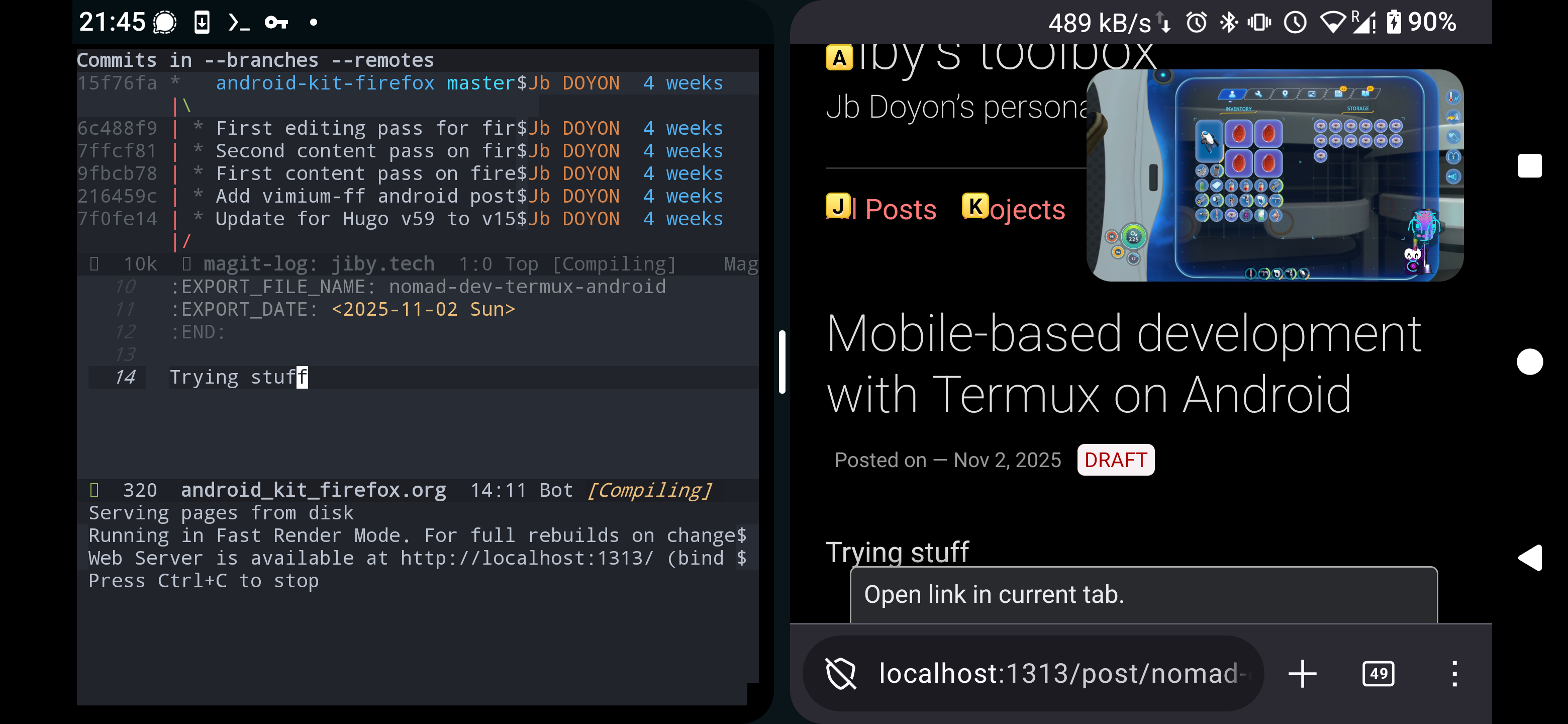
Figure 1: Screenshot of my Android device, showing a split screen of Termux terminal writing a blogpost in Emacs, and other side of Firefox serving the blog being edited, running from a local port. A floating window of Twitch stream provides entertainment. Note Firefox shows the very page of the blog being edited in Emacs, with Vimium active, ready to click links.
The picture is a lot to take in, but basically, Termux can run any commands, including in my case Emacs for editing, as well as, say, hugo, the static site generator. And since Termux can bind on local ports, it can render a local website for your phone’s Firefox1.
Firefox itself can run extensions: though on Android, it officially only has a small list of approved extensions, we can install anything by enabling Firefox’s Developer Mode, and installing the arbitrary XPI extension after downloading them directly as files. That’s how I got Vimium back2.
So Firefox extensions, a terminal full of tools, compilers and interpreters, together give a lot of flexibility in the software stack. In fact, enough power that (per screenshot) the first draft of this post was created from Termux, which is a nice feeling.
Hardware makes that software better
Smartphones have a downside for terminal use: the virtual keyboard takes up most of the screen. But hey, this is a modern device, we can fix the software with more hardware!
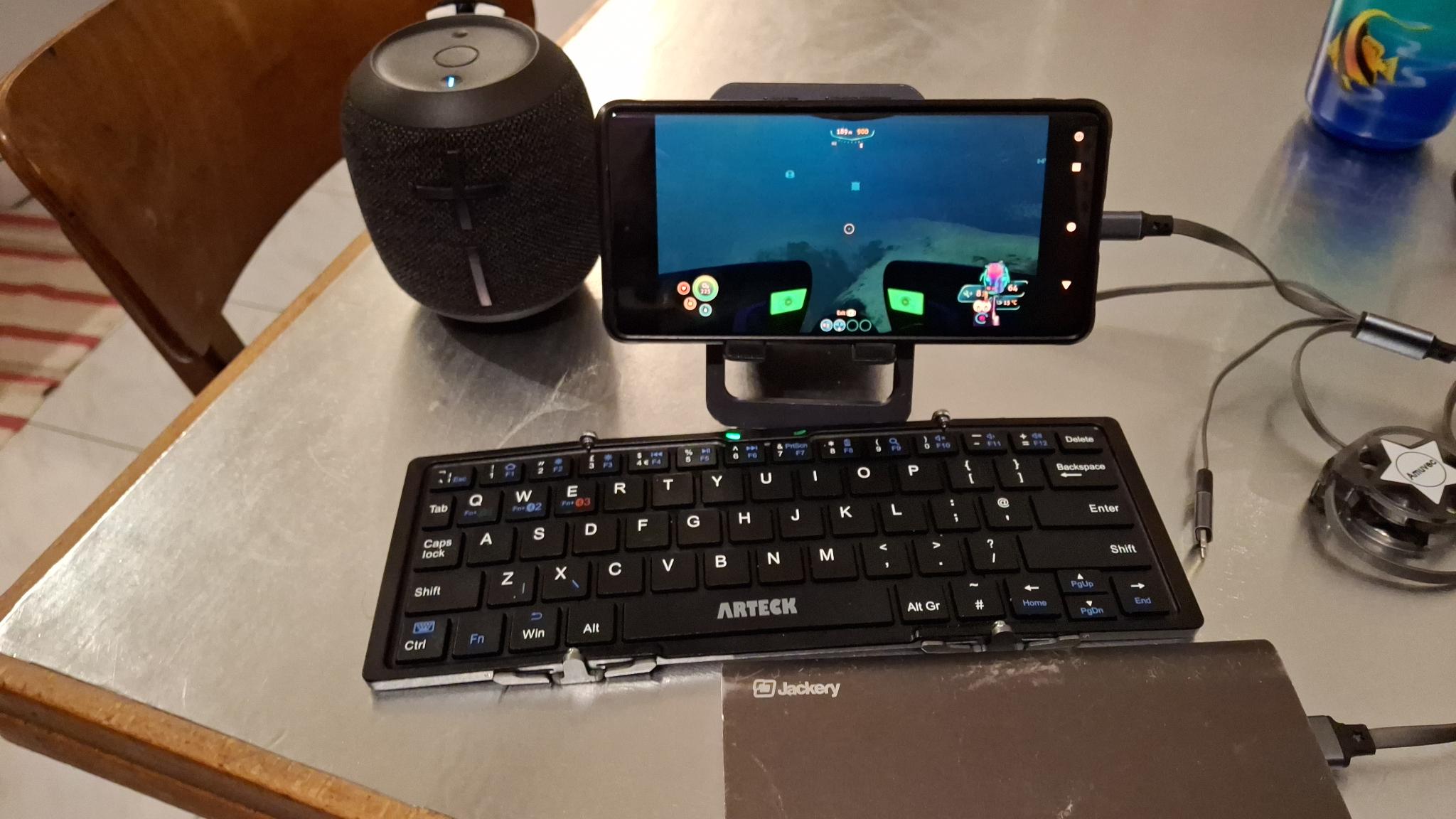
Figure 2: Watching a Twitch stream (of the game Subnautica) on Android, using a foldable phone stand, a foldable bluetooth keyboard to type to Twitch Chat, and bluetooth speakers for volume (optional). Plugged in to a portable battery for durability, by an unrollable USB cable.
This whole setup fits in a pocket (except for the battery, which is currently not pocket-friendly, but variants exist that can fit) while providing a really solid experience. In this case, the keyboard is an Arteck HB066, bluetooth foldable keyboard. Any portable keyboard would do, but this one fits really well.
Now, of course, this won’t fully replace a PC for gaming, but a lot can be done for not a lot of money, and quite conveniently, with only minimal loss of comfort from the small factor.
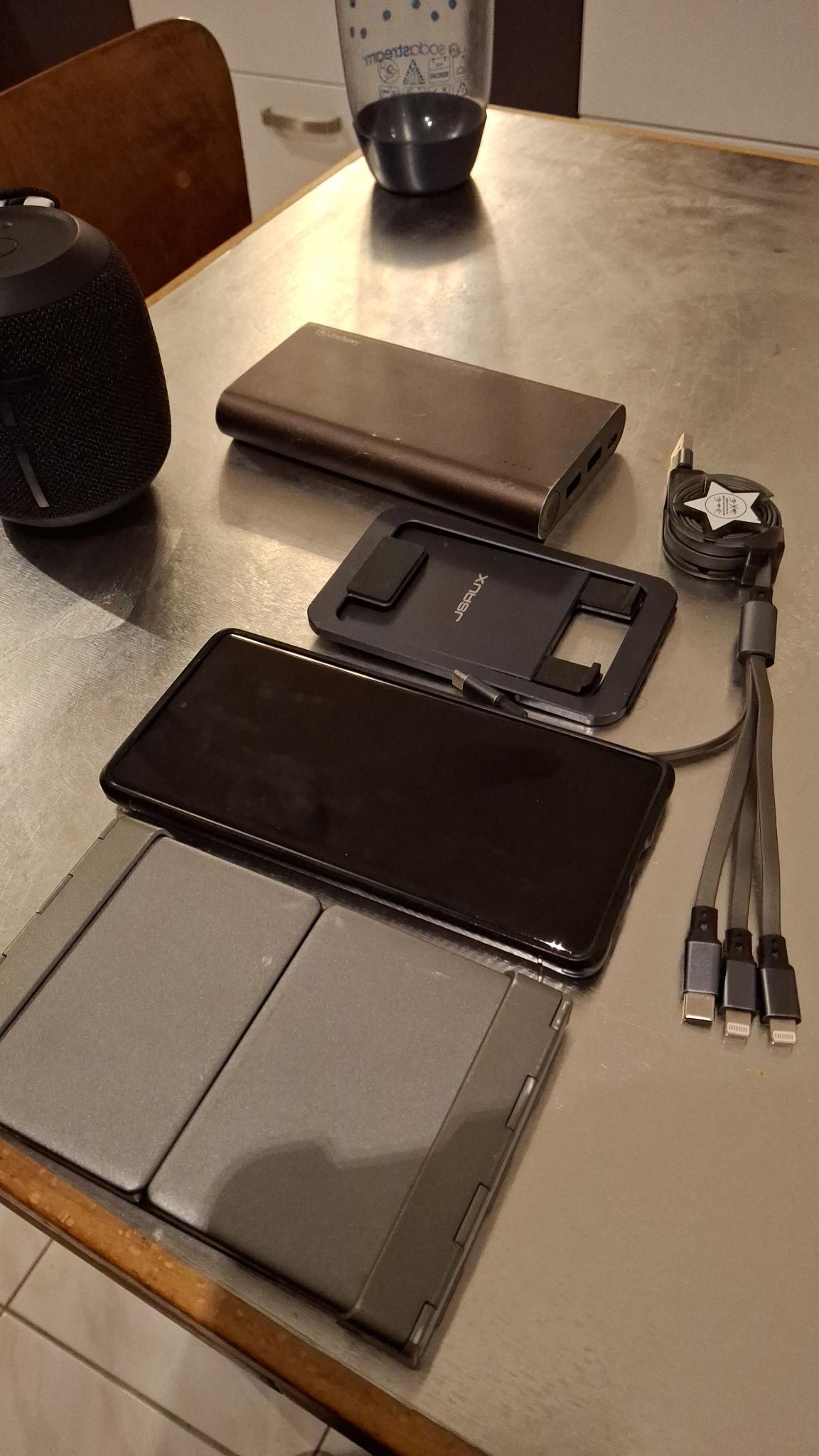
Figure 3: The same setup, collapsed for travel. This all fits in a pocket! Except the battery, of course, but smaller batteries exist.
Of course, what I’ve shown is just first attempt at cheap mobility, a slapdash personal initiative bringing together a couple tools I had lying around. There’s room for improvement, iteration.
Possible extensions
The most obvious limitation is the limited screen real-estate: this is a tiny phone screen on which we cram a lot of pixels, and would be better if we can see more, bigger text.
Depending on the amount of money you’re willing to spend, and what you count as “fits in your pocket”, we can consider external displays, upgrading the system quite a bit towards full tablet-level worthiness, while keeping connectivity of USB type C. These seem to run for $100-$600, and turn your small phone into a big tablet, able to watch films etc.
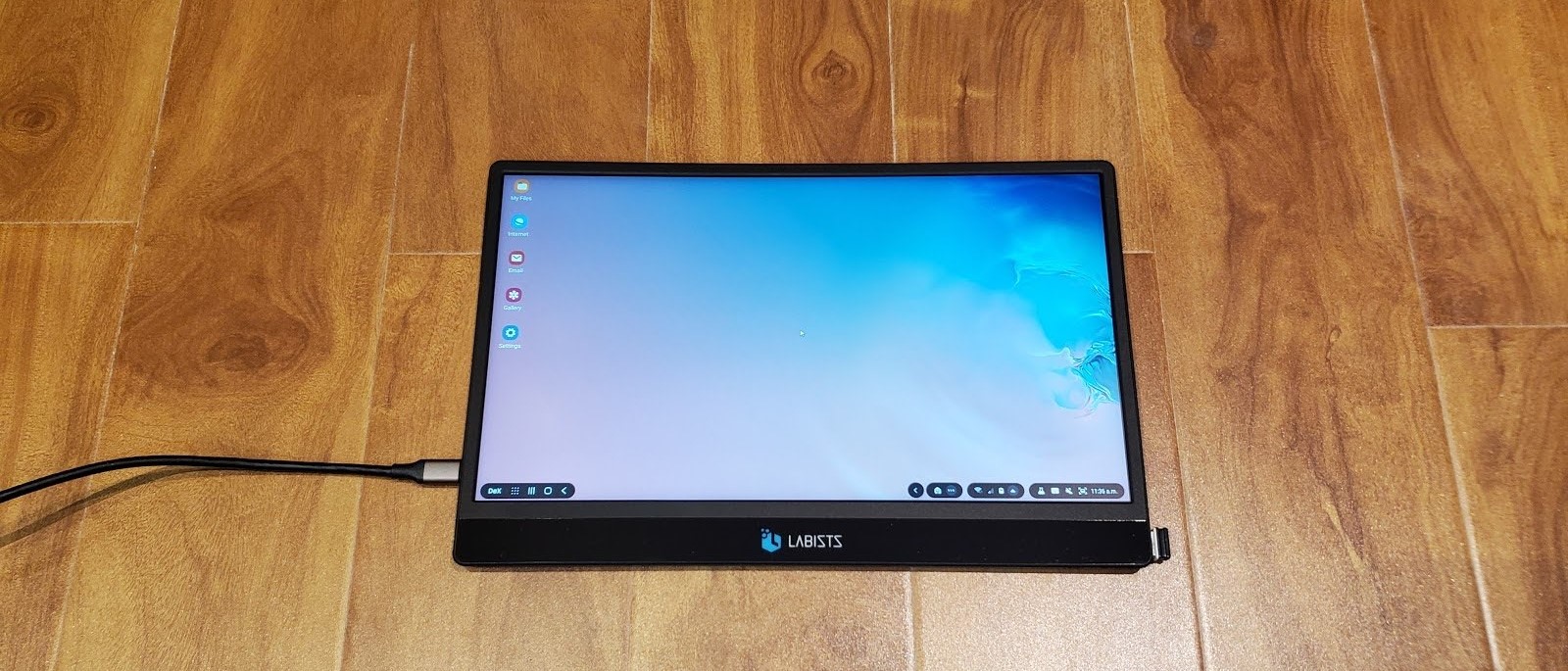
Figure 4: Sample external monitor, powered and fed by USB type C cable (credits: TechRadar). We can imagine getting a boost from turning a phone’s small viewport into an A4 paper’s page’s worth! Need some pretty big pockets though, to fit this in.
Another direction of travel can be fuller software capabilities, like by rooting the device, potentially getting a chrooted Linux installation like Debian. These solutions get quite technical, sometimes a little risky, as the closer to the hardware, the closer to making it an unusable brick. But in return we can unlock a broader, fuller software ecosystem, such as graphical apps via X11 servers, or more powerful tools because of direct access to the mobile baseband.
I’m personally very happy with just Termux and my “non-rooted sandbox”, because I’m using free software apps via F-Droid, but others may want more.
There’s also room to extend beyond the device itself, because Termux has many capabilities, like SSH, one can connect in and out of desktops, laptops, servers, running scripts, launching Android activities, dialogs, integrating with home automation etc. Not everything needs to run on the Android device itself, but Termux allows a broad amount of scripting via its Termux API.
Conclusion
You may reasonably ask: “Why did you spend so much effort to turn your phone into a tablet?”. Part of it is the challenge, part of it to learn.
Back in university, I learned about Linux by wiping Windows on my new laptop, no turning back possible. As I got more comfortable, I ratcheted it up by disabling the graphical interface, learning how to do everything from the command line: software development, wifi connection, web browsing, etc.
These “forceful immersion” challenges I found to always be a ton of fun to me, because the self-imposed limitations taught me to “use my other senses”, learning faster than reading theory around the topic.
In this case, the aim was to amplify the phone in my pocket into as close as possible to a home computer. By combining terminal tools like Termux, Firefox extensions, and supplementing an actual keyboard, we can get quite close!
There’s an other element to this, where the overall concept really appeals to me: I love the idea of a “docking station” that elevates the capabilities of an otherwise mobile device. I believe that we can do better than the arbitrary separation of phones vs tablets vs laptops vs desktops, and this is a fun, low stakes experiment to understand it.
I’ll keep tweaking the setup with new tools, adapt other parts of kit, playing digital nomad!
-
I’ve taken advantage of this port binding capability when I originally demonstrated Termux in front of an audience, by revealing that the presentation they were watching was a website hosted from my phone’s Termux, fetched over USB network by my laptop. Neat trick. ↩︎
-
I wish I didn’t have to fight free software to get it running the way I want, but Mozilla has been acting a bit like thugs on the removal of XPI extensions on mobile Firefox. ↩︎